Booka App
Shazam For Books
Whenever you are looking to buy a book and you aren't sure about the details, that is where Booka app comes to help!

Overview
Have you ever entered a bookstore and just wanted to explore some book titles that you didn't know anything about? If you did, usually, you would have to pull out your phone and search for information online and go trough multiple pages, filter through irrelevant results and piece together fragmented information to see what the book is actually about. Even for just one title, that seems like a lot of work, let alone if you wanted to browse multiple books. No matter if it is just for one or multiple books why not make it quicker?

The problem is that book discovery in a store lacks instant, structured insight that supports quick and confident decisions. There is no dedicated “scan and understand instantly” experience for books, comparable to the simplicity of Shazam for music.
📱 Manually type book titles into search engines
↔️ Jump between Goodreads and other similar websites
🔍 Filter through irrelevant results
🧩 Piece together fragmented information

Help users make faster, more confident book purchase decisions in physical stores and to bridge the gap between instinctive, emotional exploration and informed decisions, so users can quickly validate their choices, feel assured in their selections, and leave the store satisfied with books they’re excited to read.
⏱️ Enable book information through cover scan in under 5 seconds
🧾 Present concise, structured information optimized for quick scanning
📚 Reduce the need to leave the physical browsing
❤️ Preserve the emotional flow of bookstore discovery
People who want to explore buying physical books in a store either for themselves or as a gift. Across all users, the common behavioral thread is a desire for fast, low-effort validation within the physical browsing moment, without disrupting the natural flow of discovery.
📲 Mobile-first
📸 Comfortable using camera tools
⚡️ Value quick answers over deep research while shopping
The primary users are frequent bookstore browsers who enjoy discovering books visually rather than through search. They are drawn in by covers, typography, and shelf placement, often picking up multiple titles out of curiosity. Their decision-making process is fast and emotional at first, but they seek quick validation before committing to a purchase. Secondary users exhibit similar patterns but with different motivations.
Gift buyers browse with uncertainty, looking for reassurance that a book is appropriate or has good rating without needing deep literary analysis. Casual readers hesitate more and seek clarity about genre, tone, or themes before committing. Some are especially concerned with practical details. Such as avoiding buying the wrong edition or unknowingly starting in the middle of a series.

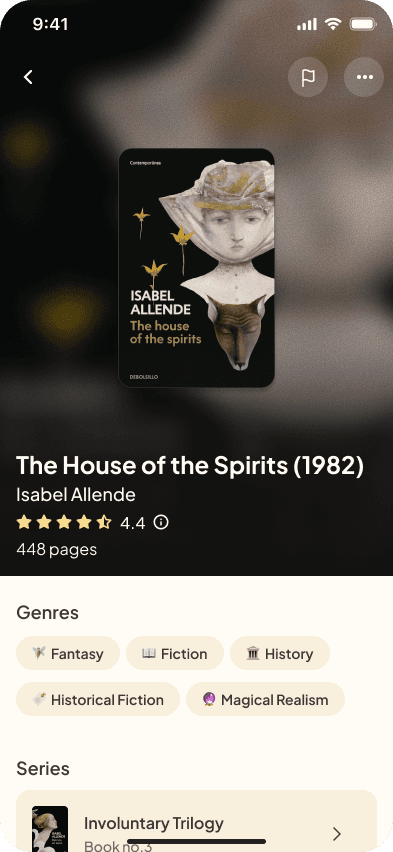
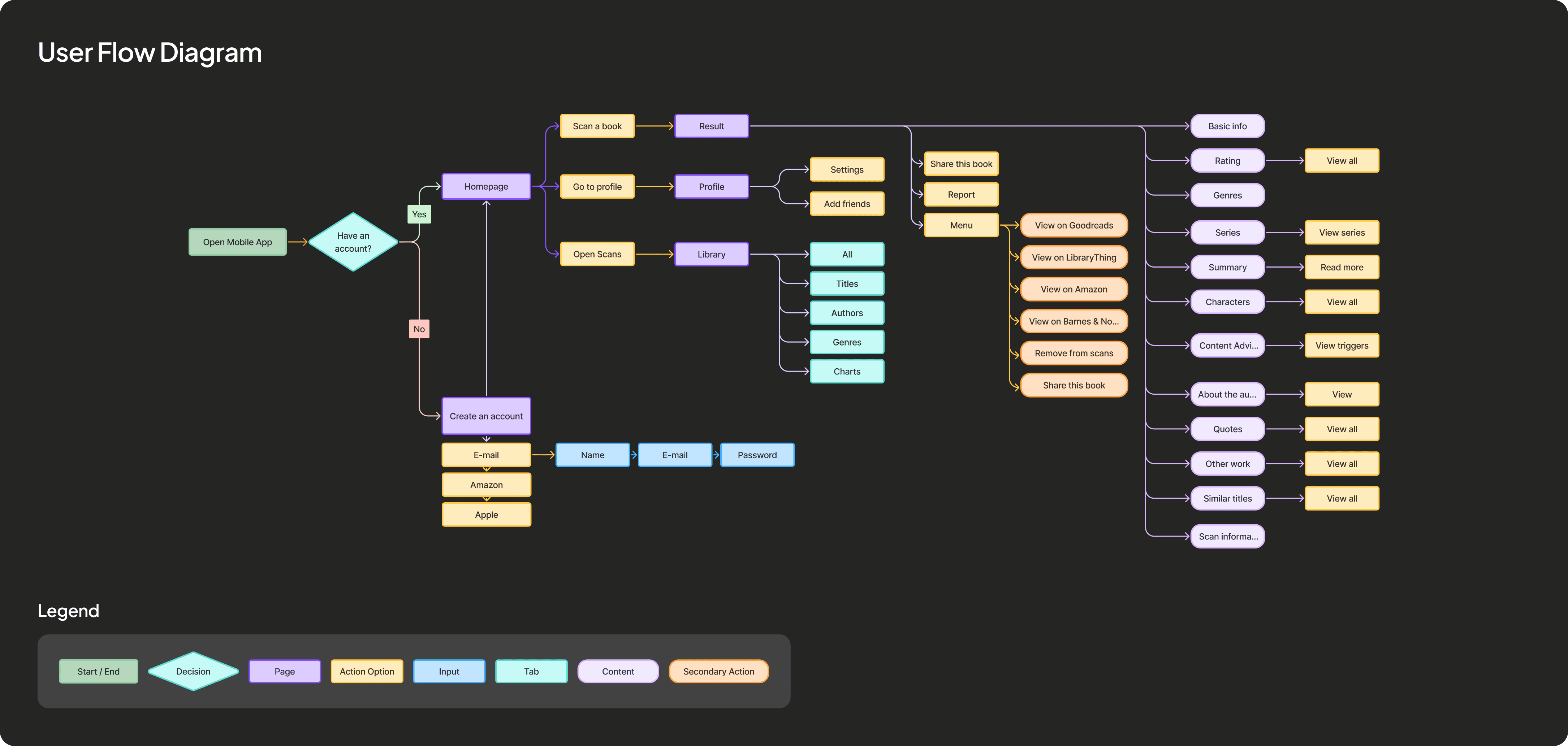
The app is designed around a single, frictionless interaction and that is scanning a book cover. Users open the app directly to the option to scan the book with no distractions or secondary navigation, mirroring the simplicity and instant feedback of Shazam. To optimize for use in physical stores, the interface accounts for environmental factors such as lighting, fast camera autofocus, clear loading feedback (“Identifying book…”), and offline fallback messaging.
Once a book is recognized, results are presented in a concise, skimmable format, emphasizing the most relevant information so users can understand a book in under 10 seconds. The experience preserves the emotional momentum of browsing by avoiding ads, overloaded review feeds, or endless scrolling, supporting rather than replacing the discovery inside a bookstore process. Finally, edge cases like multiple editions, similar covers, false recognition, or books missing from the database are addressed.

Currently in the market there is no such app that delivers quick and instant information. Apps such as Goodreads, Sumsy, BookLens and Book Scan give you an option to scan a book cover, but they all fail to provide the speed and concise information.
These options weren't built for this specific case, hence you still have to browse around multiple resources to get to the point of decision making. Book Scan is one of them, but is not free and the UX/UI has room for improvement.
The main idea was to design a minimal, modern and clean mobile application that feels calm, intelligent, and intentional. The inspiration behind the palette was an old book and wooden shelves in a bookstore, hence the very light warm yellow background with dark brown text. I almost completed a whole dark version of the app but decided to pivot since the emotional feel and background for this type of app didn't feel right for it to be just another black modern application. This palette spoke more to the world of books.

At the start, I explored richer, more content heavy screens. Quickly, it became clear that the core value of the product wasn’t depth, but immediacy. This forced me to make stricter decisions about hierarchy, progressive disclosure, and what not to show. Reducing information is often more impactful than adding it.
Even as a conceptual project, considering technical limitations (like incomplete metadata, API dependencies, and scan reliability) changed how I approached edge cases and empty states. I started designing not just for ideal scenarios, but for failure modes as well. I incorporated the principles of atomic design, hence it can work with or without particular information that is not universal to every book.
The strongest improvements didn’t come from initial ideas, but from refining flows, simplifying decisions, and removing unnecessary steps. This reinforced the importance of testing assumptions and being willing to discard ideas that don’t hold up.
The core product promise of immediacy and low friction discovery leads to reduced time to book insight and higher decision confidence and faster content consumption.
📉 Reduced average discovery time from ~2 minutes to under 20 seconds
📈 Estimated 78–85% completion rate on the first session
📊 Estimated 35–45% in a 7 day retention rate among active scanners